Guide
How to fill out a DVIR
A DVIR (driver vehicle inspection report) is how you tell your company what's wrong with a truck, and how your company shows it was fixed before anyone drove it again.
This guide goes through pretriq's report from top to bottom, then follows it to the shop and on to the next driver. The federal rules behind each step are cited as you go.
In short
- When do I need one?
- At the end of your day, for each truck you drove, when you found a defect or someone told you about one. Many companies want one every day anyway.
- What goes on it?
- Which truck it is, a tick for each item with a defect, a description of each defect, and your signature.
- Who signs it?
- You do. If it lists defects, the mechanic signs once they're fixed or found not to need fixing, and the next driver signs before driving the truck.
- How long is it kept?
- Your company keeps it for 3 months.
When you need a DVIR
The federal rule asks for a written report “at the completion of each day's work on each vehicle operated.” Drove two trucks today? That's two reports.
You need one when you found a defect, or someone told you about one, that “would affect the safety of operation of the vehicle or result in its mechanical breakdown.” Found nothing, and nobody reported anything? Then the federal rule doesn't require a report.
Many companies want a report every day, defects or not. If yours does, follow your company's rule.
The rule doesn't apply to a company that runs only one commercial motor vehicle, to driveaway-towaway operations, or to nonbusiness private passenger carriers. Your state can add rules of its own.
Source: 49 CFR 396.11(a)(1), (a)(2) and (a)(5)
Filling out the form
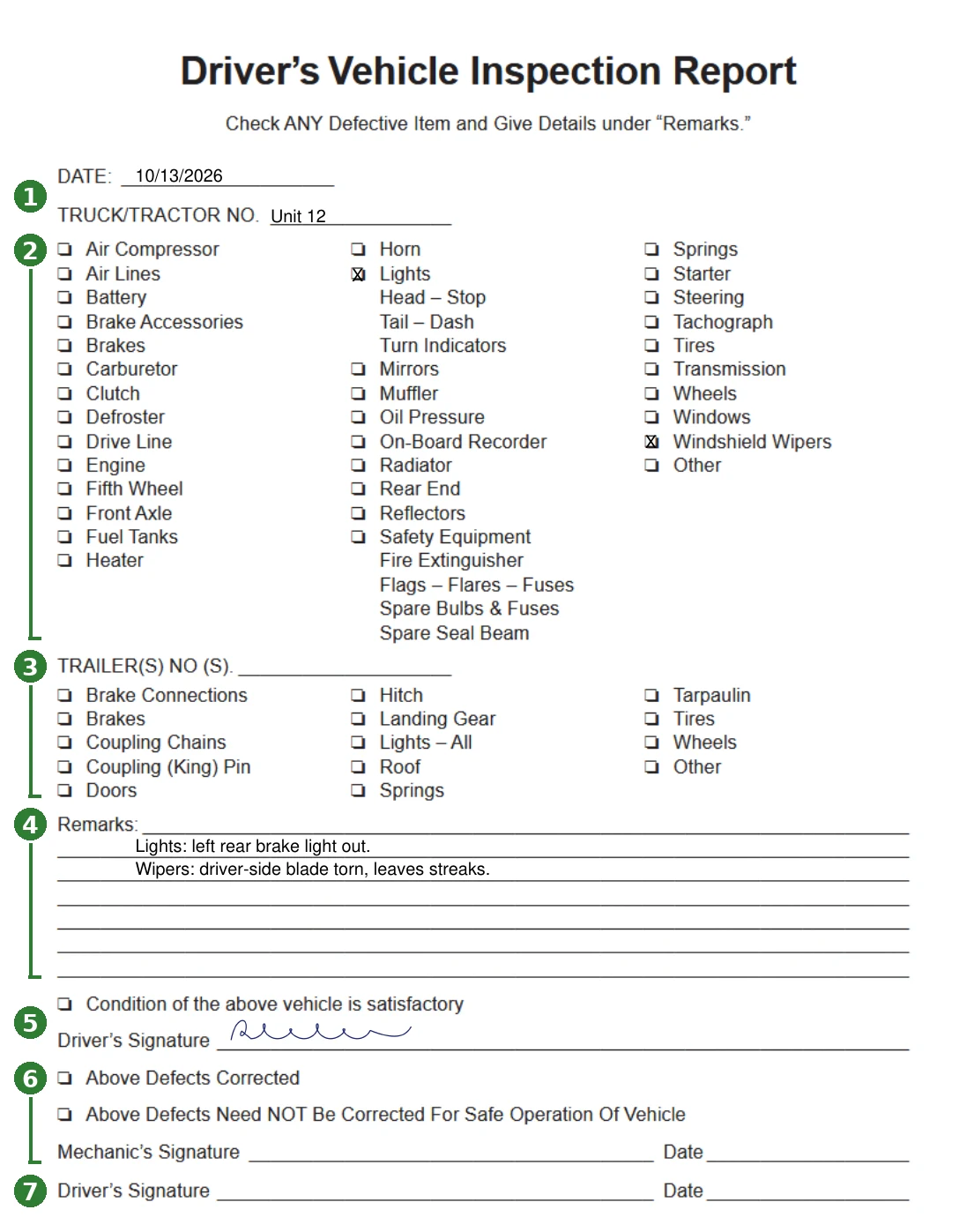
Here's a sample report made with pretriq, for a box truck with two defects. The numbers on it match the steps below.
-
1 Date and truck number
pretriq fills in today's date. Under Truck / Tractor No., enter your company's unit number for the truck, or its license plate if it has none. The rule says the report “must identify the vehicle,” and the USDOT number can't: every truck in the company shares it.
-
2 Truck / Tractor Defects
Tick only the items with a defect. A tick means “this has a problem,” not “I checked this.”
Not sure what counts as a defect? Tap the ? beside a box on the form, or read How to do a pre-trip inspection, which goes through every box in the order you'd check it. A parking brake problem goes under Brakes, and a defect with no box of its own goes under Other.
-
3 Trailer(s) Defects
Pulling a trailer? Enter its number and tick its defects the same way. No trailer? Leave this section blank.
-
4 Remarks
For each box you ticked, say where the defect is, what's wrong and how bad, so the mechanic can find it without calling you. Write “Lights: left rear brake light out,” not “lights.”
List defects that someone told you about, too. The rule covers any defect “discovered by or reported to the driver.”
-
5 Condition and your signature
Found no defects? Tick “Condition of the above vehicle is satisfactory.” Found some? Leave it unticked.
Then sign the driver's line, on screen with your finger or on the printed copy. Driving as a team? One of you signs, as long as you both agree on the defects.
When you're done, tap Generate (Generate & Save if you're logged in), then download or view the PDF. Hand it in the way your company wants it.
Source: 49 CFR 396.11(a)(2)
After you hand it in
A report that lists defects needs two more signatures before the truck goes out again. Markers 6 and 7 on the sample show where.
6 The mechanic
Your company repairs any defect that would affect safety before anyone drives the truck. Then whoever handled it ticks Above Defects Corrected or Above Defects Need NOT Be Corrected For Safe Operation Of Vehicle, and signs and dates the report.
That's the company certifying that each defect “has been repaired or that repair is unnecessary before the vehicle is operated again.”
7 The next driver
Before driving, the next driver reads the report and signs the last line, to show they reviewed it and that the repairs were certified. That can be you, on a later day.
They still do their own pre-trip: before driving, a driver must “be satisfied that the motor vehicle is in safe operating condition.”
Keeping it
Your company keeps the report, the repair certification and the next driver's signature for 3 months from the day you wrote it.
pretriq can't reopen a saved report yet. If the repair happens later, print the PDF, and the mechanic and the next driver sign the paper copy.
Source: 49 CFR 396.11(a)(3) and (a)(4), and 396.13
The 11 items every report covers
The rule names 11 parts and accessories every report must cover. Each one has a box on the form, though not always under the same name.
| The rule says | Tick this box |
|---|---|
| Service brakes including trailer brake connections | Brakes Trailer: Brake Connections, Brakes |
| Parking brake | Brakes Trailer: Brakes |
| Steering mechanism | Steering |
| Lighting devices and reflectors | Lights, Reflectors Trailer: Lights – All |
| Tires | Tires Trailer: Tires |
| Horn | Horn |
| Windshield wipers | Windshield Wipers |
| Rear vision mirrors | Mirrors |
| Coupling devices | Fifth Wheel Trailer: Coupling (King) Pin, Coupling Chains, Hitch |
| Wheels and rims | Wheels Trailer: Wheels |
| Emergency equipment | Safety Equipment |
The other boxes, like Battery, Engine and Oil Pressure, aren't named in the rule. A defect there still goes on the report if it would affect safety or lead to a breakdown.
Source: 49 CFR 396.11(a)(1) and (a)(2)
Common mistakes
- Writing the USDOT number as the truck number. It names the company, not the truck. Use the unit number or the plate.
- Ticking every box you checked. A tick means a defect. A report with every box ticked says the truck is falling apart.
- Ticking a box with no remark. The mechanic needs to know where and what. Every tick gets a line under Remarks.
- Ticking “satisfactory” on a report with defects. Tick it only when you found nothing.
- Leaving out a defect someone told you about. If another driver or dispatch mentions one, it goes on your report.
- Signing the next driver's line yourself. It's for whoever drives the truck next, after the repairs are certified. That can be you on a later day, never in the same sitting.
- Skipping a small defect. A brake light that's out is small, and it still affects safety. If a defect would, it goes on the report.
Paper or electronic
Since March 23, 2026, the federal rule says a DVIR “may be created and maintained in electronic format,” following 49 CFR 390.32, the rule for electronic documents and signatures.
pretriq makes a PDF you can print, download or share, and saves the report to your dashboard if you're logged in. Your company decides whether it takes reports on paper, as a PDF or in its own system, so ask before you switch.
Source: 49 CFR 396.11(a)(6) and 396.13(d)
Ready to fill one out? Tap Start pretrip on the home page.
Go to the home pageSources
- 49 CFR 396.11, Driver vehicle inspection report(s)
- 49 CFR 396.13, Driver inspection
- 49 CFR 390.32, Electronic documents and signatures
- Electronic Driver Vehicle Inspection Reports, 91 FR 7893 (February 19, 2026)
This guide explains the federal rules in plain words. It isn't legal advice, and it doesn't replace your training, your state's CDL manual or your company's policy.